
For online sellers handling damage-photo refund claims

Unsure about a damage photo? Know what to ask for next.

Casilo checks customer damage photos for signs of AI generation or editing, shows what the evidence does and doesn’t support, and drafts your evidence request, customer message or appeal.

See a full sample report

E01Review record

Fictional example
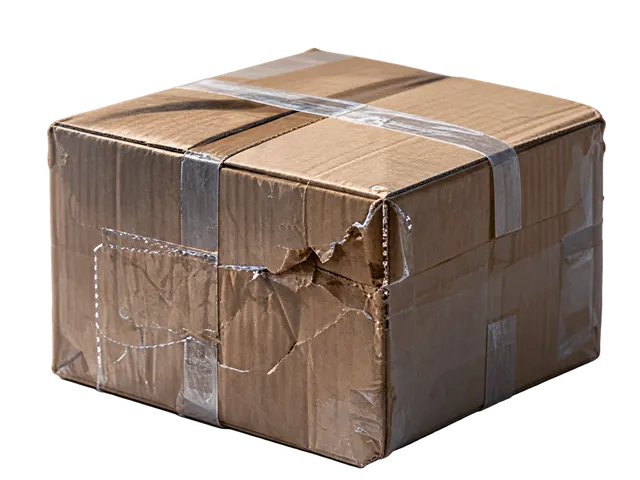
Illustrative evidence E01: a torn shipping box with the product outside the frame

E01 · Packaging photo

Three separate questions

Visible damage
Outer box is tornSeen
Damage to the item
Not shown in this photoNeeds evidence
AI generation or editing
Not checked in this exampleNot run

Ask the customer for

  1. Photos of the whole item and the damaged area
  2. The original image files
Illustration of a report’s layout. No detection was run.
  • You make every refund decision
  • Every report lists which checks ran, and which didn’t
  • Drafts are yours to edit and send

What you get

Three things for every claim you review

  1. A careful read of the photo

    Signs of AI generation or editing, kept separate from whether the damage itself is real, with every check and its result listed.

  2. What’s missing, in plain terms

    The gaps that stop you deciding fairly, and no more than three specific things to ask the customer for.

  3. Drafts ready to edit

    An evidence request and customer message before you decide. If you dispute a platform decision, an appeal draft that points to each attachment.

Sample report

Read a full sample report

A fictional claim: a buyer sends a photo of a torn box and asks for a refund. It shows what you get back.

E01 Sample report

A buyer sends a damaged packaging photo and requests a refund.
Fictional · no detection run
Illustrative evidence E01: a torn shipping box with the product outside the frame
E01 · Packaging photoThe photo does not show the product itself.

Finding

Needs evidence

The packaging is torn. Product damage is still unverified.

What to request next

  1. Clear photos of the whole product and damaged area
  2. The original image files supplied by the buyer

Message and appeal drafts

Edit to fit the case.

Could you send photos of the whole item and the damaged area, plus the original image files if you have them?

How it works

Two moments, two workflows

Use Casilo before you answer a refund request, or after a platform has decided against you.

Before you decide on a refund

When a buyer’s damage photo looks off and you haven’t resolved the refund request yet.

  1. Upload the buyer’s photos

    Add the damage photos and a short note about the product and the claim.

  2. Read the review

    Casilo checks for signs of AI generation or editing and points to the details worth a closer look.

  3. Ask for what’s missing

    Get a suggested next step (proceed normally, request more evidence, or look closer) with an editable customer message to send.

You get a review summary, points to verify and an evidence request.

Our limits

What Casilo will and won’t do

Detection tools give clues, not verdicts. Casilo is built around that.

Casilo will

Show which checks ran
Every report lists the checks that ran and their results. A visual observation never stands in for dedicated detection.
Keep uncertainty visible
Evidence gaps and other plausible explanations stay in the report. A detection score is never presented as a fraud probability.
Leave the decision with you
Casilo prepares the requests, messages and paperwork. Refunds, replies and appeals are your call.

Casilo won’t

  • Decide or deny a refund for you
  • Label a customer as a fraudster
  • Turn detection output into a fraud probability or accuracy score
  • Promise that a platform will accept your appeal

FAQ

Common questions

Early access, how reviews work, and what you get.

Not yet. Joining puts you on the beta waitlist, and we’ll email your invitation when the beta opens.

Waitlist

Get an invitation when Casilo opens

Leave your email and we’ll write when early access is ready. No date has been set yet.